The way you start a presentation can decide if it’s going to be a success or a flop. As the common saying goes, “first impressions matter,” so do the first words you say during presentations. These words set the tone, build interest, and help listeners connect with your message from the start.
In this guide, you will learn how to start a presentation, including practical tips, real examples, and how to perfect your intro slide using AI.
Tips on How to Begin a Presentation
Here are some professional tips to make your presentation opening strong and engaging:
➤ Share a Personal Story: Tell a personal story that resonates with the audience. This will create an emotional bridge, letting them connect with you and understand the purpose behind your presentation.
➤ Use Captivating Images: According to MIT Neuroscientists, the brain needs 13 milliseconds to identify what the eyes see. This means that when you start a PowerPoint presentation with captivating images, you will most certainly grab attention faster than words.
➤ Open with a Statistic or Rhetorical Question: Beginning with a surprising statistic or a “what if” question will immediately spark curiosity, prompting the audience to think deeper about the topic and want to know your verdict.
➤ Cite a Powerful Quote: Starting a presentation with a quote from a popular person can add authority to your presentation. However, make sure the quote is relevant to the topic.

How to Start a Presentation Speech (5 Examples)
How to begin a presentation is to first know the people you’ll be speaking to and the context of the topic. Here are some examples:
1. Start a Seminar Presentation
“I believe that all of us came here today for practical solutions to get better at our skills. In the next few minutes, I will show you three ways to upskill and increase your income.”
This presentation introduction example works well because seminar audiences want clear value. With a start like this, you’ve validated their pain points and stated what they will gain if they listen.
2. Start a Business Presentation
“In the last six months, companies like yours have faced tighter budgets and higher expectations. Today, I will share a few strategies to help you stay competitive without overspending.”
A presentation introduction slide like this is effective because it positions you as someone who understands the problems and solutions. It shows that the slides contain relevant insights—something decision-makers desire.
3. Start a School or Classroom Presentation
“Before I begin, let me ask you something: have you ever wondered why all students have to wear the same uniform? By the end of this presentation, the answer will be clear as day.”
An intro slide that uses a simple rhetorical question like this pulls the audience in without stress. It states that the presentation is meaningful and not far-fetched, which students find easier to follow.
4. Start a Project Presentation
“Our project grew out of a simple observation: a small change could make a big difference. In this presentation, I will explain what we changed, why it matters, and what we learned in the process.”
An introduction for PPT presentations like this works because it introduces the project as purposeful. It promises improvements and clear reasoning, which are key elements people look for in a project update.
5. Start a Sales or Pitch Presentation
“Over the last year, more than 70% of businesses like yours have been forced to do more with less. What if one tool could cut your workload without reducing quality? That’s what I’m here to show you.”
A presentation introduction example like this is great because it contains a statistic of similar businesses going through the same challenge, and then it promises a realistic solution.
How to Perfect Your Presentation Introduction Slide Using AI
AI has revolutionized the way and speed at which things are done. This includes customizing your presentation introduction slide to be perfect.
Let’s explore how that’s done:
Method 1. Generate an Intro Slide in PowerPoint with AiPPT
Are you looking for the fastest and most creative way to craft an impressive intro slide for your presentation? AiPPT is the key — just input the topic and get an award-winning presentation within seconds. You no longer have to worry about how to start a presentation. It gives you the perfect intro and complete slides to follow.
AiPPT is loaded with several smart features like one-click slide creation, AI design suggestions, and layout optimization to upgrade the look and flow of your presentation.
Follow these steps to generate an intro slide in PowerPoint with AiPPT:
Step 1: Log in to AiPPT
Go to AiPPT.com and sign in or sign up (if you’re a new user). Then, click on Create from Topic.

Step 2: Generate an Outline
Enter your topic to generate an outline for the presentation. Click Edit guidelines to make changes.

Step 3: Choose a Template
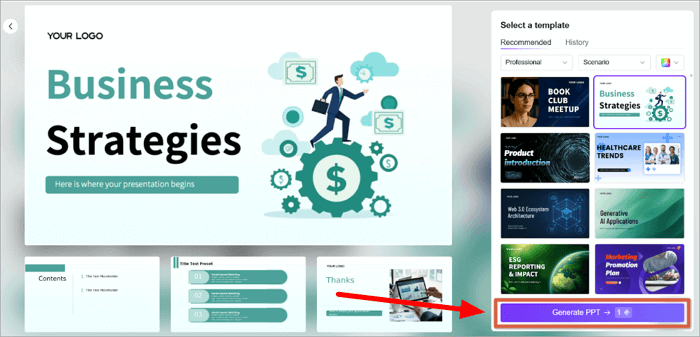
Select a template that complements your presentation. Then, click Generate PPT.
Step 4: Download
Your presentation is ready. Click ‘Edit’ to make changes or ‘Download’ to save to your computer.

Method 2. Download Templates for an Introduction for PPT Presentations
If you want to save time and still create a professional-looking slide with a strong intro, ready-made templates are an excellent option. No need to bother with manual designs anymore; just focus on the slide’s content.
AiPPT offers 200,000+ stunning PPT slide templates, covering different areas like business, marketing, education, technology, etc. There are several options for you to find the perfect fit for your slides.
Follow these steps to download templates from AiPPT:
Step 1: Log in to AiPPT
Go to the AiPPT templates website and sign in/sign up.

Step 2: Select a Template
Select the template design that’s most suitable for your presentation.

Step 3: Download
Click Download to save the template on your computer.

Step 4: Open the Downloaded Template
Go to Downloads on your computer and double-click the downloaded template. It will open as a PowerPoint file. You can customize the template as you want.

Conclusion
How to start a presentation doesn’t have to be complicated. The most essential thing is to know your audience. This will decide the best way to start the presentation (whether a personal story, captivating image, stat, or quote).
We’ve shared a few presentation introduction examples you can adapt. But with the help of AI tools like AiPPT, you can generate the perfect intro slide with one click. You can also download beautiful templates for slides in your presentation.
FAQs about the Introduction for PPT Presentations
Below are answers to some commonly asked questions on how to start your presentation.
1. How to start a seminar presentation in college?
Before you introduce yourself in a presentation as a student, keep in mind that your audience is a mix of students and teachers who expect you to show that you understand the topic.
Follow these steps:
- Greet everyone politely and introduce yourself.
- State your topic and why it’s important.
- Follow up with an intriguing opener, like a question or fact.
- Explain what you’ll cover and then transition into your first point.
2. How to start your presentation at a conference?
Conference audiences often include professionals, researchers, or industry experts. They expect expertise and clear communication of value.
Follow these steps:
- Start with greetings, and then introduce yourself with your name, the company you work for, & role.
- Acknowledge the event organizer(s) briefly.
- Clearly state the topic.
- Begin with a compelling hook, such as a statistic, question, trend, or brief anecdote.
- Outline what they will gain and then move to your core content.
3. How to start a PowerPoint presentation from the beginning?
When starting a PowerPoint presentation, you must ensure that the opening words capture everyone’s attention.
Follow these steps:
- Introduce yourself and your topic clearly.
- Briefly explain the purpose of your presentation.
- Grab their attention with a quote, image, question, or data.
- Give a short overview of your agenda and then move to the next slide to begin your main content.